Sprint Delta documentation
Sprint Delta shows what changed in each Jira sprint after it started, and makes it searchable with JQL. It has been submitted to the Atlassian Marketplace and is awaiting Atlassian’s review.
Getting started
- Install Sprint Delta from the Atlassian Marketplace (opens in a new tab).
- It imports your active sprints first, then the last six closed sprints of each board (up to 180 days old), from Jira’s own change history. Progress is in Jira settings › Apps › Sprint Delta.
- Open a space with a Scrum board and choose Scope changes in its tabs (it may sit under More). The sprint ••• menu in the backlog, and the board’s ••• menu, open the same report.
Company-managed and team-managed Scrum boards are supported. Kanban boards have no sprints.
Reading the report
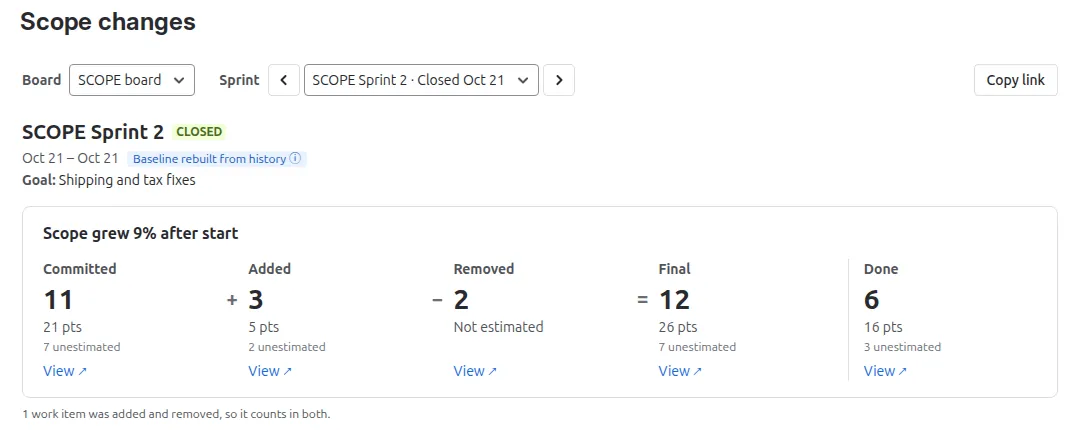
The report reads Committed + Added − Removed = Final, then Done:
- Committed: work items in the sprint when it started.
- Added and Removed: work items that joined or left after the start, including ones created straight into a running sprint. A work item added and removed again counts in both, and a note says so.
- Final: in the sprint now, or at close for a closed sprint.
- Done: of those, in the board’s last column at close (or now, while the sprint runs), the rule Jira’s Sprint Report uses.
Points use the board’s estimation field; work items without an estimate are counted as unestimated, as in Jira’s Sprint Report. Every number has a View link to exactly those work items in work item search.
The change log groups changes by sprint day, with who made each change and when; By person groups them by who made them, with what each added and removed. First hour marks changes in the first hour after the start, which are usually late planning rather than new work. Export CSV downloads it. The trend on the space tab shows the last six closed sprints; select one to open it. Changes to work items you can’t see are left out, and a note says how many.
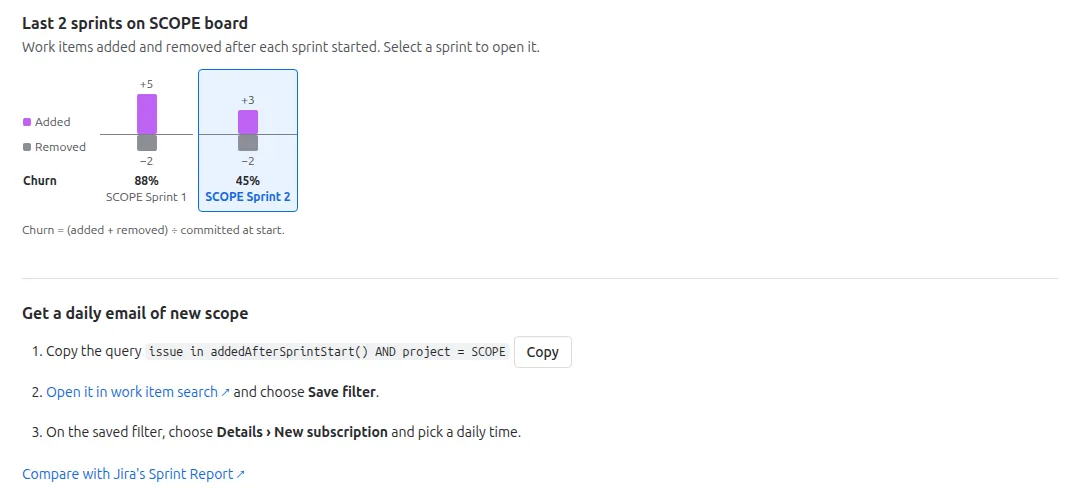 (open full size)
Dashboard gadget
On a dashboard, choose Add gadget and search for Sprint Delta. Pick any Scrum board you can open and how often it refreshes. It shows the sprint the report would open (the one that just closed, for three days, otherwise the active one) with the scope equation and the trend; select a sprint to open its report.
Sprint history on a work item
Open a work item and expand Sprint history: every sprint it was in, whether it was there at the start or joined later, who moved it and when, and how often it was carried over.
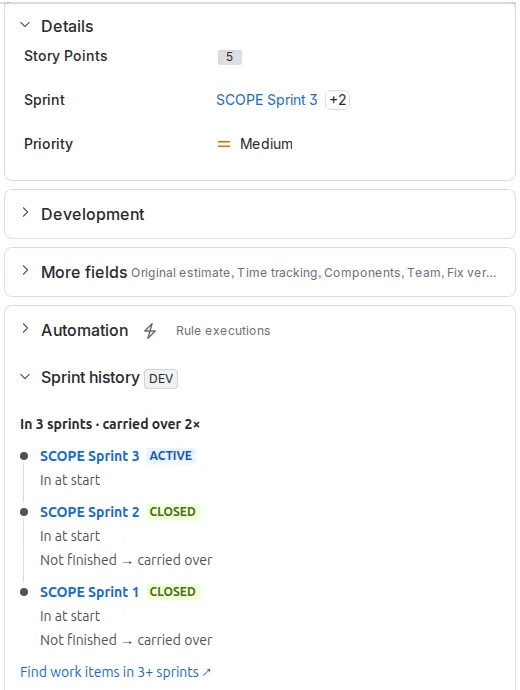 (open full size)
JQL
Write issue in …: Jira doesn’t let apps extend sprint in ….
addedAfterSprintStart(sprint…): work items added after the sprint startedremovedAfterSprintStart(sprint…): work items removed after the sprint startedcommittedAtSprintStart(sprint…): work items in the sprint when it startedcarriedOverFrom(sprint…): work items unfinished at the sprint’s close and in the next sprint at its start (default: lastClosed)sprintsStartedBetween(from, to?): work items in sprints that started in the rangesprintsCompletedBetween(from, to?): work items in sprints completed in the range
Sprints (up to five, combined): an id (42), an exact name ("Checkout Sprint 12", case ignored, every sprint with that name), active (the default) or lastClosed (each board’s most recently closed sprint). To find a sprint’s id, open it in Scope changes and choose Copy JQL.
Dates: 2026-10-01 or 2026/10/01 in the site’s time zone (to is inclusive), or relative: -14d, -2w, -3M, -1y.
Fields for quick filters, gadgets and sorting:
sprintScopeAdded: sprint ids the work item was added to after startsprintScopeRemoved: sprint ids it was removed from after startsprintScopeCommitted: sprint ids it was committed to at startsprintScopeDoneAtClose: closed sprint ids it was done in at closesprintScopeCarriedOver: closed sprint ids it was carried over fromsprintScopeSprintCount: how many sprints it has been insprintScopeLastChange: date of its latest scope change
Examples:
issue in addedAfterSprintStart(): unplanned work in running sprintsissue in addedAfterSprintStart(lastClosed): for the retro: unplanned work last sprintissue in committedAtSprintStart(lastClosed) AND statusCategory != Done: committed but still not doneissue in carriedOverFrom(): for the retro: carried over from last sprintissue in addedAfterSprintStart() AND sprintScopeLastChange >= -1d: pulled in since yesterday’s stand-upissue in sprintsCompletedBetween("-30d"): sprints completed in the last 30 days
For a daily email, save a query as a filter, then choose Details › New subscription. If a function can’t answer (a sprint is still importing, or a name doesn’t exist), Jira shows the reason and how to fix it.
Admin page
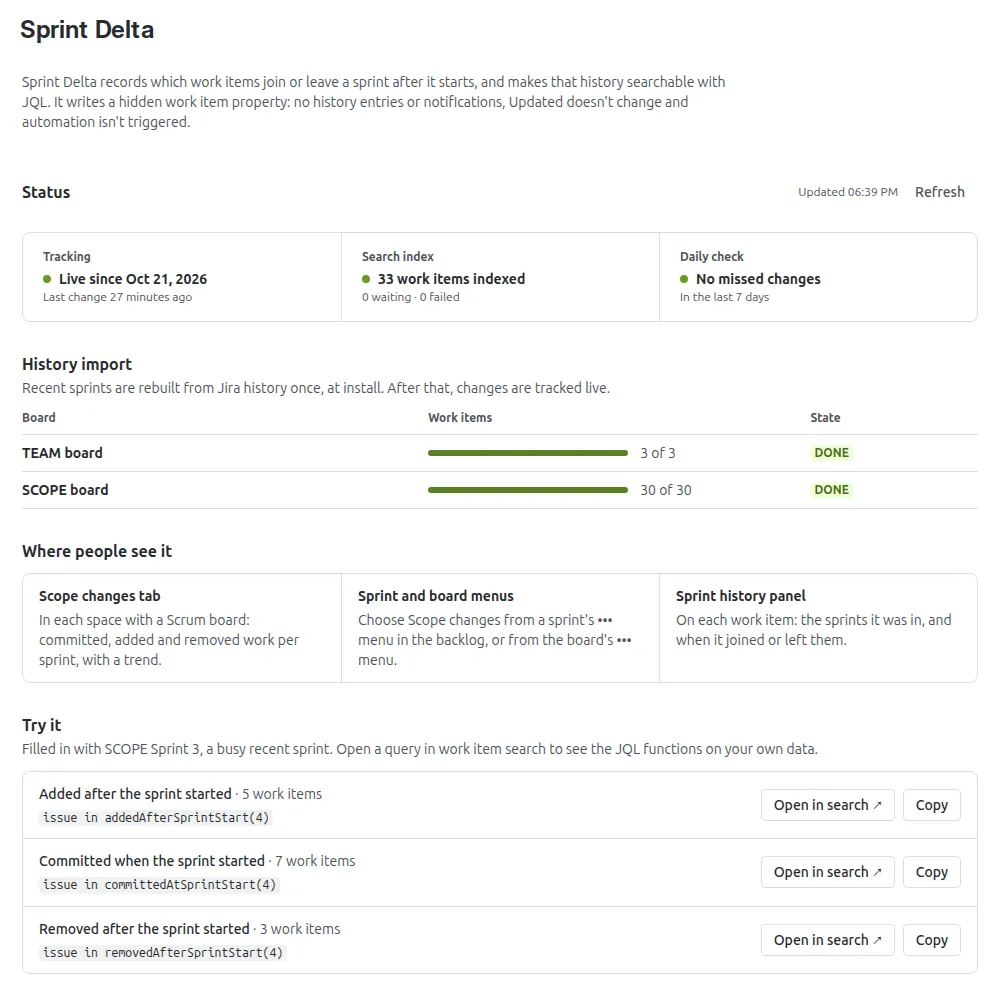 (open full size)
- Status: tracking since when, the search index, and the daily check for missed changes.
- History import: progress for each board.
- Try it: live counts for a busy recent sprint, with links to work item search.
- Maintenance: Rebuild a board or sprint from Jira’s history, Import older sprints beyond the import window, or pause the search index (only if support asks).
What it changes in Jira
Only a hidden property on work items that powers the JQL. Writing it adds no history entries, sends no notifications, doesn’t change Updated and doesn’t trigger automation.
Limits
- Sprints older than the import window are imported on request, from the admin page.
- A single report shows up to 2,000 work items; use the JQL functions for bigger sprints.
- Changes made while the subscription was inactive are filled in from Jira’s history after renewal.
Help and privacy
Support · Privacy policy. Sprint Delta is built on Atlassian Forge and sends no data outside Atlassian.